All ABOUT IT: Everything about Pakistan Media, Technology, Phones, IT, Windows, Anti Hacking - Hacking, General Information and All Popular Topics.
Subscribe For Free Updates!

We'll not spam mate! We promise.

Showing posts with label Web Apps. Show all posts

Thursday, 14 November 2013

[EARN] Pakistan 1st Trusted Earning Site 2014


What is Pak Link?

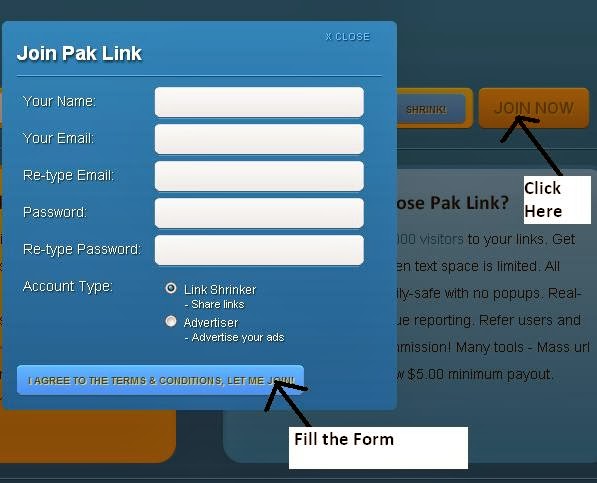
Pak Link is a free URL shortening service with a twist.. you get paid to share your links on the Internet! Just register for a free account and start shrinking. You get paid for every person that visits your URLs. Example URL for Google: http://www.paklink.tk/1 Place your short urls on Facebook, Twitter, forums, personal websites and any social networking sites.


Why choose Pak Link?

Earn more than $5.00/1000 visitors to your links. Get short URLs, great for when text space is limited. All advertising is strictly family-safe with no popups. Real-time statistics with revenue reporting. Refer users and get a whopping 20% commission! Many tools - Mass url Shrinker, Easy Links, Low $5.00 minimum payout.
Method::::
===========================


=================================================

=================================

=========================

==============================
Link:


VISIT SITE Click ME

Saturday, 27 July 2013

Kuwait Deporting Immigrants If they use Viber, Skype etc


Kuwait authorities are deporting immigrants if they are caught using voip services such as Viber, Skype, Tango and other similar services.
My friend was removing/reinstalling Viber again and again i asked the reason. She told that Viber is not allowed in Kuwait.
Kuwait says using voip services is illegal. They are trying to catch people who are still using them.

via Aaqil

Tuesday, 28 May 2013

Twitter Introduces Two-Step Authentication


twitter Twitter Introduces Two Step Authentication
Twitter has finally introduced two-step authentication for its users to enhance security.

For those who aren’t familiar, two-step authentication means that Twitter users – after inputing username and password – will be sent a unique passcode on their phones via SMS for every login. This passcode will be used as second password before users are actually logged-in the to the website.
A confirmed email address and a verified mobile phone number is a must to use this feature.
Here is how you can enable Two-Step Authentication for Twitter:
  1. Visit your account settings page.
  2. Select “Require a verification code when I sign in.”
  3. Click on the link to “add a phone” and follow the prompts.
  4. After you enroll in login verification, you’ll be asked to enter a six-digit code that we send to your phone via SMS each time you sign in to twitter.com.
twitter thumb Twitter Introduces Two Step Authentication
Currently allowed third-party apps will continue to work with two-step authentication. However, for adding new apps – with two-step authentication enabled – users can go to app-page to request for a temporary password for app access.
Pakistani users must keep this in mind that after you enable two-step authentication, there’s no way to login without passcode verification sent to you via SMS, even if your cellular network is offline.

Tuesday, 21 May 2013

SEO Your Facebook Page – Watch How (Video)


SEO Your Facebook Page

Facebook has hit a billion users, 11,000,000 in Australia making it the worlds largest social media network. A billion users means hundreds of thousands of Facebook pages, does yours stand out, can it be found in search engines? check out the video below

Also check the following Facebook Tips

Marketing through the use of Facebook tabs is an easy and efficient way to get the word out. Why not create a “Promotions” tab and highlight items you have on sale, coupons you’ve made available or even contests you’re running. It’s a great way to allow your followers to easily keep up with what’s going on.
Use Facebook to share links to your site. You should try writing weekly articles or launching a video blog so you can create more content on a regular basis. Your audience will subscribe to your updates on Facebook if you create quality content. Make sure you mention your Facebook campaign in your articles or videos.
Give your Facebook page a really strong theme. Know what your about and deliver it in the graphical look of your page. Remember, you have one chance at making an excellent first impression on your new Facebook guests. To turn them into real fans, you’ve got to deliver from the first page load.
Now it’s not that difficult to work on a Facebook marketing strategy, but you need to sit down and plan one. It will take a little bit of time and some effort, but it is something that can be done by anyone who puts their mind to it. I find asking yourself the following important questions can start you on the right path to marketing strategy success:
  1. When setting up a new Facebook page, have a I selected the right type? Facebook gives several options picking the right one is imperative.
  2. What will my vanity url vanity be? This is important for SEO
  3. What is the purpose of my site, do I want to keep current customers updates, get new customers, get bookings, orders or jobs? This is a very important question because based on the answer, will change the way you setup your page and the content that you deliver on a daily basis.
  4. What focused content will I share with my Facebook page users? Plan your subjects ahead of time
  5. How much is your time worth? Work out what an hour of your time is worth.
  6. How much time can you spend managing your Facebook page? Is it better doing it myself or getting a professional to do this for me
The old saying really works here, if you fail to plan then you plan to fail, I hope this article and video helps. As always if you have any questions feel free to contact me and I will do my best to help.

Tuesday, 14 May 2013

Blackberry to Launch BBM for Android and iOS


BBM Blackberry to Launch BBM for Android and iOS
BBM, Blackberry’s signature instant messaging service, will be available for Android and IOS users later this year. With this all Android, iOS and Blackberry devices will be able to cross-communicate using BB10’s feature rich BBM services.
There are over 60 million active BBM users using blackberry devices, who will now be able to connect with their cross-platform friends from Android and iOS.
With this announcement, Blackberry has shown its confident over BB10 – its latest OS release for blackberry devices, however, at the same time company is giving away its one of most handy tools to other operating systems.
This move from Blackberry also hints that firm – once used to be the monopoly in smartphones – is now starting to think about integrating its services with other platforms, which is a good thing.
Blackberry said that app will be free for both Android and iOS users, while iOS 6 and Ice Cream Sandwich will be required to run BBM.
Blackberry said that app will feature messaging and group services initially, however, with time all BBM features will be added for Android and iOS users. BBM has lately started offering screen sharing, BBM voice, video.
BBM for Android and iOS will offer:
  • The immediacy of BBM chats
  • Multi-person chats
  • Voice note sharing
  • BlackBerry Groups, where BBM users are able to set up groups of up to 30 people and share calendar, photos, files and more

Monday, 6 May 2013

Use Facebook In An Excel Sheet


Few months back, I had posted an article on How To Access Blocked Sites. Many of them used those techniques to access the blocked sites at work.
On that post, How to Access Blocked Sites, most of them had comment about the access on Facebook. So later I had posted an article on how to Access Facebook Through GMail. And here I come up with another way to access the Facebook.

As we all know, the social networking sites like Facebook, Orkut, Tweeter etc… are blocked in most of the offices. And most of the employees are desperate to login to Facebook and do not wish to get caught. Keeping these views in mind, Diesel introduced a new application which looks like an Excel Workbook, but it is actually an application to access Facebook account.
After installing Be Stupid At Work, 1st of all, you need to login into your Facebook account through the application. As soon as you would login, it would request your for permission, allow access to it.
Now you can the Facebook. You can update your status, like and comment on posts etc…etc… Of course, its not the full Facebook experience, but still it is a wonderful application to access Facebook.
This application is a replication of Microsoft’s Excel, but it doesn’t totally resemble like the Excel Sheet. All the function are been disabled. Only in the file tab, you can find the functions which would help you to use Facebook. Excel sheets have never been this fun. I hope you all will enjoy it!

Tuesday, 30 April 2013

How To Use Facebook Places


Facebook’s new Places feature lets you share your 

whereabouts with all your friends. Here’s how it works 

on a smartphone or PC. 
 Facebook's new Places feature lets you share your current location by "checking in" from your smartphone. Whether you never really got into earlier location-based social networking services like Gowalla or Foursquare or just want to know what it is (and how to turn it off), read on for everything you need to know about Facebook Places.

Keep in mind that Places isn't available everywhere just yet--early reports indicate that it's United States-only, for now, but with significant gaps at the moment--so you may just have to wait.

Checking In Via Smartphone or PC

  
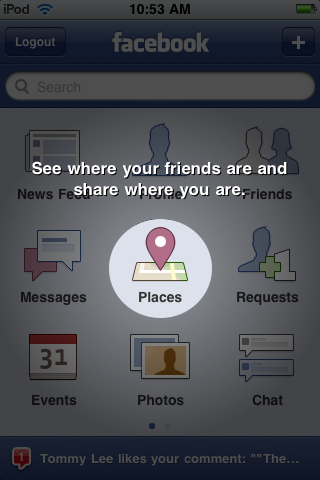
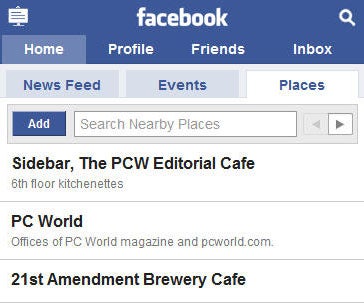
Before you can share your location with your Facebook friends, Facebook needs to know where you are. Just open touch.facebook.com in your Web browser (or use the Facebookfor iPhone app on your iPhone, iPod Touch, or iPad), and you'll see a tab under "Inbox" called "Places." For the iOS app, it'll show a new icon in the middle of the home screen.

 
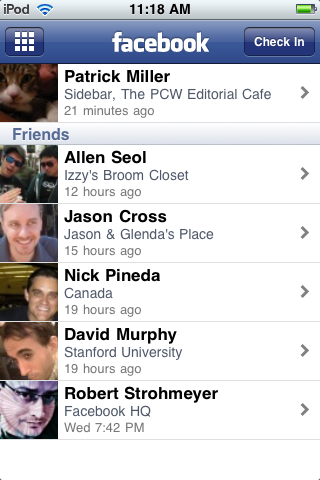
Tap Places, and you'll see your recent check-ins as well as your friends' check-ins. From here, you can find out more details about the places your friends are checking into (map location, description, directions, comments, and other check-ins), or you can check yourself into a nearby location by pressing the Check In button at the top-right corner of the page.
If you can't find the right place to check in from, you can browse more nearby locations by pressing the right arrow button under the Places tab until you find it (if you're using the iPhone app, just scroll all the way down and press Show More Nearby Locations).
  
The list of available locations comes from other people's check-ins and listings from Bing's mapping engine, so you might have to add your location yourself--just press Add, and it will take you to a page where you can fill out a name and description.
Once you tap Check In, you'll be presented with a list of nearby locations where other people have checked in. Tap the one you want to check into, and you can choose to comment on what you're doing there or add your Facebook friends to your check-in (Press the What are you doing? and Tag Friends With You buttons, respectively). Next, press the big Check In button, and it will show up on your News Feed.
While Places is mostly meant for smartphone users, it doesn't depend on a GPS device to find your location--you can check in from a laptop or iPod Touch, too. Just go to touch.facebook.com in your browser (you'll need Internet access, of course), and you can check in from your desk or cafĂ©.

Checking In With Friends

Unless you're on Facebook just to show everyone what a loner you are, you'll eventually want to add the friends you're hanging out with to your Facebook Places check-in. All you have to do is choose the Tag Friends With You option while checking in.
 
Once you've added your friends and checked in, it'll show up on their News Feed as well. If they haven't used Facebook Places yet, it won't show up on their feed until they've approved the check-in; they'll see a little alert the next time they log in, asking them to allow or deny the check-in.
You can add friends only when you're checking in, so if you forget about adding someone and want to add them later, you're out of luck.
This can be rather tricky for users concerned about privacy--while researching this piece, I checked several of my PCWorldcolleagues into local bars at about 11am on a workday--so if you want to use Facebook Places without letting your friends check you in, you can disable it by turning off Friends Can Check Me Into Places in the privacy settings (click the link for detailed instructions). Once this is disabled, your friends can still try to add you at check-in time, but it won't display on the actual check-in.

Owning Your Facebook Place

  
While anyone can add a Facebook Place, business owners can turn the listing in Places into a proper Facebook Page, with Likes and a Wall and all that other fun stuff. (Don't forget to read "Three Ways Business Can Take Advantage of Facebook Places.")

Start by checking in from your Place (or adding it, if it doesn't show up in the list of nearby Places), and click the link on the bottom of the page that says Is this your business?
Facebook doesn't want people cybersquatting on someone else's business listing, so you'll have to check a box certifying you're an official representative of the business and click Proceed with Verification to continue.
  
Next, you'll have to provide your business's contact information, including your Federal Employee ID number (if applicable) and some kind of official documentation (Certificate of Formation, Articles of Certificate of Incorporation, a local business license, or a BBBaccreditation).
Once you've submitted that information and received the okay from Facebook's UserOperations team, you'll be in full control of your new Place. No word on what happens if you're caught impersonating an employee, and we don't recommend trying it.
How To Turn Off Facebook Places

Dabbled with Facebook Places and decided it isn't for you? There are a handful of settings you'll have to change to fully deactivate it. Start by going to Account, Privacy Settings, and click Customize settings under Sharing on Facebook.
From here, you'll need to change the settings for Places I Check In, People Here Now, and Friends Can Check Me into Places (under the Things Others Share heading).
You'll need to change one more setting: Go back to Privacy Settings, choose the Edit your settings option under the Applications and Websites heading, and click Edit settings for Info accessible to your friends.

Online Photo Editing at PhotoShop


The online enhancement tool offered by Adobe.

If you want to edit your photographs with a free professional application you can access Photoshop Express from your browser. With the online version of Photoshop you will be able to enhance your photographs very quickly with the normal quality offered by Adobe.
Quick and simple enhancement with Photoshop Express.

Photoshop Express Editor gathers the main features of Photoshop in a very intuitive interface. Apply effects to your images, carry out adjustments or edit them with the basic tools that it offers.

The best thing about Photoshop is a compact online tool

In the Express edition of Photoshop you will find:
  • Basic editing tools: crop, resize, automatic correction, elimination of red eyes, saturation control, etc.
  • Adjust the balance of whites, focus or exposure.
  • Effects: pixelling, distortion, drawing, black and white, crystallized, etc.
  • Image decorating with texts, shaped, frames and other elements.
Try Photoshop online free to improve your photographs instantly.

Web Link

Author:
Adobe Systems Incorporated
O.S.:
Webapp
Webapp
License:
Freeware
Languages:
English German Portuguese Chinese
Date:
05/31/12 (Updated)
Last rev.:
07/05/12
File size:
-
Download type:
Web link - HTTP


SCREEN SHOOTS