All ABOUT IT: Everything about Pakistan Media, Technology, Phones, IT, Windows, Anti Hacking - Hacking, General Information and All Popular Topics.
Subscribe For Free Updates!

We'll not spam mate! We promise.

Wednesday, 27 November 2013

Yandex Mail: Best Alternative to Outlook, Yahoo and Gmail

 Yandex Mail: Best Alternative to Outlook, Yahoo and Gmail
Yandex.Mail will not only keep you away from US spy agencies but it also have many cool features which would make you love your inbox even more.
Yandex is most popular search engine in Russia. They recently started approaching users outside Russia by translating Yandex services into English and other languages. Yandex.Mail is one of their services which is now available for international users as well.
My system specifications are 3.0ghz processor, 2GB RAM and Outlook/Gmail were always making my browser slow. But Yandex.Mail is fast, simple and lightweight for systems.
I shall talk about features which are different from other email providers, will not talk about basic email features and features which gmail/outlook are also providing. For example Yandex.Mail also provides unlimited storage, XMPP/Jabber chat support, IMAP/POP3 support etc.
  • Yandex.Mail have email pictures support to and from other email providers. No you don’t upload pictures with all your email contacts one by one like in Gmail. But Yandex Automatically fetches images of senders of other email servers. Users of other email services will also see your Yandex.Mail profile picture in their email inbox.yandex pics support 300x168 Yandex Mail: Best Alternative to Outlook, Yahoo and Gmail
  • Yandex.Mail’s fast loading lightweight interface saves a lot of time. Yandex.Mail takes less than 15 seconds to fully load while outlook and gmail take more than 40 seconds to load web completely. Reading and responding to emails is fun. In Gmail I used to spend about 15 minutes everyday to read and reply emails from friends. But in Yandex it takes my less than 5 minutes everyday.
  • Yandex.Mail have email delivery notifications feature which notifies you when your email reaches recipients server.
  • When writing new email you can select to receive link to your email’s copy as SMS for free.
  • Yandex.Mail gives email scheduling option. Very useful to schedule Eid Mubarak emails in advance before you get busy with shopping and guests.
  • When you are reading long emails, Yandex.Mail’s top floating bar gives you quick options such as go to Top, Reply, Delete buttons which make email use fast and comfortable, unlike gmail where you have to all scroll up or bottom to click buttons.yandex floating bar 300x77 Yandex Mail: Best Alternative to Outlook, Yahoo and Gmail
  • Another feature I liked in Yandex.Mail is that if user wants he can ask Yandex to show social media profiles of the sender. Helps get connected to friends and grow social media presence.yandex social profiles 300x84 Yandex Mail: Best Alternative to Outlook, Yahoo and Gmail
  • Yandex.Mail’s one click sending email templates can sometimes save a lot of time while replying to emails and very useful for businesses.yandex email templates Yandex Mail: Best Alternative to Outlook, Yahoo and Gmail
  • Yandex.Mail have option to set reminder to send another email if your friend haven’t replied to your first email.yandex email reminder Yandex Mail: Best Alternative to Outlook, Yahoo and Gmail
  • Send cool emails at cool times to your friends without any efforts using Yandex E cards within Email Compose screen. Add card (from many), add text and send. Recipient won’t be bothered to click any special link to view your card.yandex cards 300x154 Yandex Mail: Best Alternative to Outlook, Yahoo and Gmail
  • Tired of typing with keyboard? You can send voice and video messages using your Microphone and Webcam with Yandex.Mail.
  • Yandex.Mail have better sender’s email digital verification than gmail and outlook. Not only big companies but Yandex check individuals also for their email sending methods. If suspicious emails are detected, Yandex will warn you. Trusted senders are shown with a tiny green icon.yandex digitial signature Yandex Mail: Best Alternative to Outlook, Yahoo and Gmail
  • Yandex.Mail have built in RSS reader where you can add your favorite sites to get updates from them. Yandex’s RSS reader feature goes along all Yandex mobile apps. Your reader stays with your email everywhere.
  • Yandex.Mail supports jabber chat. You can use Yandex.Mail mobile apps or use any jabber client on computer or mobile to chat with google talk, nimbuzz and other xmpp/jabber friends using your Yandex ID.
  • Yandex.Mail have better inbox sorting. Sort emails by weeks, months, end of month, start of month, by year.
  • Yandex.Mail keeps all sent and received email attachments gathered at one place. You can search for any file or view them all as lists. They can also be sorted by weeks, months and year.
  • Yandex.Disk gives 10GB storage and provides features like google drive. But better than google drive and widely available on almost all mobile devices and computers. Works with Linux OS without downloading Yandex.Disk application.
  • Detailed logs: Yandex.Mails have taken steps for security. They not only give details of ip logs but also other email logs such as email fetching etc. Logs are saved for months.
yandex logs Yandex Mail: Best Alternative to Outlook, Yahoo and Gmail
  • Different themes and Yandex.Mail have three different views.
b setup  layout  promo vertical en 300x184 Yandex Mail: Best Alternative to Outlook, Yahoo and Gmailb setup  layout  promo horizontal en 300x184 Yandex Mail: Best Alternative to Outlook, Yahoo and Gmail
Try Yandex.Mail, it’s still new and Yandex team listens/responds to user feedbacks. Several good IDs are still available for registration and it is easy to switch from other email provider to Yandex. You can import all your gmail/outlook/yahoo and other new and old emails to Yandex inbox.
Links:
Source: Aaqil's Blog

Thursday, 14 November 2013

[EARN] Pakistan 1st Trusted Earning Site 2014


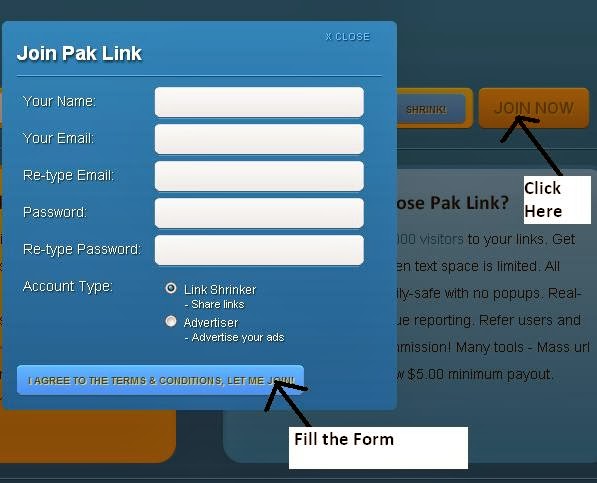
What is Pak Link?

Pak Link is a free URL shortening service with a twist.. you get paid to share your links on the Internet! Just register for a free account and start shrinking. You get paid for every person that visits your URLs. Example URL for Google: http://www.paklink.tk/1 Place your short urls on Facebook, Twitter, forums, personal websites and any social networking sites.


Why choose Pak Link?

Earn more than $5.00/1000 visitors to your links. Get short URLs, great for when text space is limited. All advertising is strictly family-safe with no popups. Real-time statistics with revenue reporting. Refer users and get a whopping 20% commission! Many tools - Mass url Shrinker, Easy Links, Low $5.00 minimum payout.
Method::::

===========================


=================================================

=================================

=========================

==============================
Link:

VISIT SITE Click ME

Tuesday, 29 October 2013

How to remove LAST NAME on FACEBOOK

You may have observe that there are some people who only have their first names in Facebook. Impressive? I’ll walk you on how to do it. 
Disclaimer: Hackdonor.com is not responsible to any misuse of this guide. This tutorial is solely for educational purposes. Actually Indonesian users can remove their last name. To do this, we need an Indonesian Internet Protocol address ( Proxy )for us to appear on Facebook as Indonesian.

 Things needed: *.Internet Protocol Proxy Address ( should be Indonesian ) *.
Mozilla Firefox Browser Steps on how to remove or hide last name on Facebook: *.Open up Firefox Browser *.Go to Settings or Alt + T + O- keyboard short-cut *.
Click on Advance tab>Network>Settings *.
Manual Configuration then input any of these proxy servers from Indonesia.Input any of these proxy servers from Indonesia. 110.139.207.196 port:8080 222.124.35.114 port:8080 202.152.6.10 port:8080 
202.152.156.213 port:8080 
124.81.113.183port :8080 
202.77.96.151 port :8080 
If the above proxies are not working you can find other Indonesian proxies in google. *.
Check, “use this proxy for all protocols” *
Done setting up the browser. *.
Login to Facebook *.
In some cases if you have Facebook security enabled ( There will be verification process ) *.
Click on wrench /settings icon *.
Account Settings *.
Language Settings> SelectBahasa Indonesiaas primary language *.
Edit your name and remove last name. *.
Log out your account *.
Go toSettingsorAlt + T + O- keyboard shortcut *.
Click onAdvance tab>Network>Settings *.
In network settings,Select no proxy.
Done. 
Congratulations!! Set your language back to English:)

PTCL is Likely to Discontinue the Student DSL Package

PTCL Student Package PTCL is Likely to Discontinue the Student DSL Package
A note published on October Monthly bills of PTCL.
This probably won’t be very pleasing for all the students out there, but the news is that PTCL is likely to phase out its extremely popular student package over a period of next few months.
While we don’t have official confirmation for this, however, sources confirm us that company is looking for ways to substitute its student package with other similar products.
It merits mentioning here that PTCL has communicated its customers through monthly bills this month that 1 MB student package would be charged at Rs. 1,250, while 2 MB student package will be charged Rs. 1,450 from November 1st, 2013.

Not to mention, these charges are usual tariff for normal broadband packages.
Student segment, as mentioned above, is immensely lucrative and shares hefty amount of broadband subscribers for PTCL, the market leader in broadband market.
With changing market dynamics, company is now looking for ways to capitalize the niche with similar but capped products to boost revenues. One such example is Economy Broadband Package, that offers 1Mbps speeds at a monthly charge of Rs. 499, but comes with 10 GB data limit per month.
PTCL told that customers should expect a wide array of products for students starting 2014. Company said that not only various new broadband packages will be announced but more technologies will be brought into the scope to entertain the students.
However, for time being at least, the discount granted to students for broadband DSL is over.

iPad Air Spec Comparison With Other Tabs in the Market

iPad Air1 iPad Air Spec Comparison With Other Tabs in the Market
Tim Cook with the new iPad Air during the launch event of iPad Air during last week.
Apple’s much-anticipated iPad Air comes with several new performance and design boosts, plus a new name but is it the best tablet on the market? We check that out via a spec sheet.
To make things interesting, we even threw a Surface Pro 2 which, many will argue, is a full-fledged PC and that’s true too.


iPad AirNokia Lumia 2520Samsung Galaxy Note 10.1 (2014)Sony Xperia Tablet ZSurface Pro 2
OSiOS 7.0.2Windows RT 8.1Android 4.3 Jelly BeanAndroid 4.1.2 Jelly BeanWindows 8.1
Dimensions240 x 169.5 x 7.5 mm267 x 168 x 8.9 mm243.1 x 171.4 x 7.9 mm266 x 172 x 6.9 mm275 x 173 x 13.5 mm
Weight469g615g540g495g907g
DesignAluminum UnibodyPolycarbonate PlasticPlastic and leather-like finishMatte PlasticVaporMg
Display9.7 inches10.1 inches10.1 inches10.1 inches10.6 inches
Resolution1536 x 2048 pixels1080 x 1920 pixels2560 x 1600 pixels1200 x 1920 pixels1080 x 1920 pixels
Processor64-bit 1.3Ghz Apple A72.2Ghz Qualcomm SnapDragon 8002.3Ghz Qualcomm SnapDragon 8001.5Ghz Qualcomm SnapDragon S4 Pro1.6Ghz Intel Core i5-4200U Haswell
RAM/Storage1 GB; 16/32/64/128 GB2 GB; 32 GB expandable3 GB; 16/32/64 GB expandable2 GB; 16/32 GB expandable4/8 GB RAM; 64/128/256/512 GB expandable
Rear-Camera5 mp; 1080p video at 30 fps6.7 mp; 1080p video at 30 fps8 mp; 1080p video at 60fps8.1 mp; 1080p video at 30 fps1.2 mp HD
Front-Camera1.2 mp HD2 mp HD2 mp Full HD2 mp Full HD1.2 mp HD
ConnectivityMIMO Wi-Fi, Bluetooth 4.0, USB 2.0, Lightning PortWi-Fi, Bluetooth 4.0, USB 3.0, NFCWi-Fi, Bluetooth 4.0,microUSB 2.0, IR Blaster, USB-OTGWi-FI, NFC, microUSB 2.0, Bluetooth 4.0, IR BlasterMIMO Wi-Fi, USB 3.0, microSDXC, MiniDisplay Port,Bluetooth 4.0, USB 2.0
Water-proofNoNoNoIP57-certifiedNo
Battery32.4 Whr8000 mAh8220 mAh6000 mAh48 Wh
PriceStarts at $499Starts at $499Starts at $549Starts at $499Starts at $899

The iPad Air, at least on paper, is lagging behind the competition in several aspects but again, Apple has never tried to compete in a numbers race and that is the best part. As usual, the iPad Air is perfect in doing the basic things, plus, it is unmatched when it comes to ecosystem.
It may not be the most productive but the free suite of iWork apps has drastically improved that too. With a competitive price and a strong backing from the App Store, it remains the tablet to beat (at least when it comes to sales).
Again, its better to look for only the things which are important to you before making a decision regarding buying anyone of these.